

Wordpress Trackable Social Share Icons
Please Note: Support is no longer available for this plugin.
Along with our Blog Development services, Ecreative Internet Marketing has also developed a custom Wordpress plugin, Trackable Social Share Icons, to aid our clients in monitoring the social reach of their blogs by allowing clicks on the social share icons to automatically track in Google Analytics. This plugin is also provided free to the Wordpress community, and can be downloaded at Wordpress.org. Compatible with Wordpress 3.2.1, requires Wordpress 2.9 or higher.
Latest Update: v1.3 added Pinterest and new Google +1 in-line icon sets.
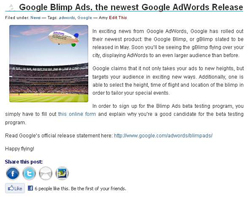
The Trackable Social Share Icons plugin places social media icons on your blog posts, pages, and/or exerpts -- including Facebook, Facebook Like, Google +1 and Twitter icons, as well as a dozen others. When a user clicks on the social media icon, they get a small window that auto-populates with the blog post title and a shortened URL -- all without ever leaving your blog page. Whenever anyone clicks on one of the icons, that click will automatically be tracked within your Google Analytics (a very common question we're asked is how to track those clicks). You'll be able to see which social media outlet is shared the most, and exactly how many clicks each icon got, and which pages users are clicking from.
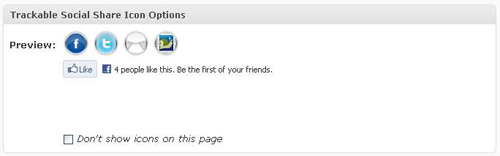
The plugin is completely customizable, allowing you to choose which social media icons appear, customize what icon style to use, and exactly what size to make them -- you can even upload your own custom icons. You can choose to disable the icons on certain posts or pages, or only place them on certain posts or pages via shortcode. Click data is not shared with us or any third party -- only someone with access to your Google Analytics will be able to see it.
Trackable Social Share Icons Google Analytics tracking works only with the newer, asynchronous Google Analytics (see FAQ). If you don't have Google Analytics, Trackable Social Share Icons will still work, you just won't be able to track your clicks.
Social Media Icon Customization
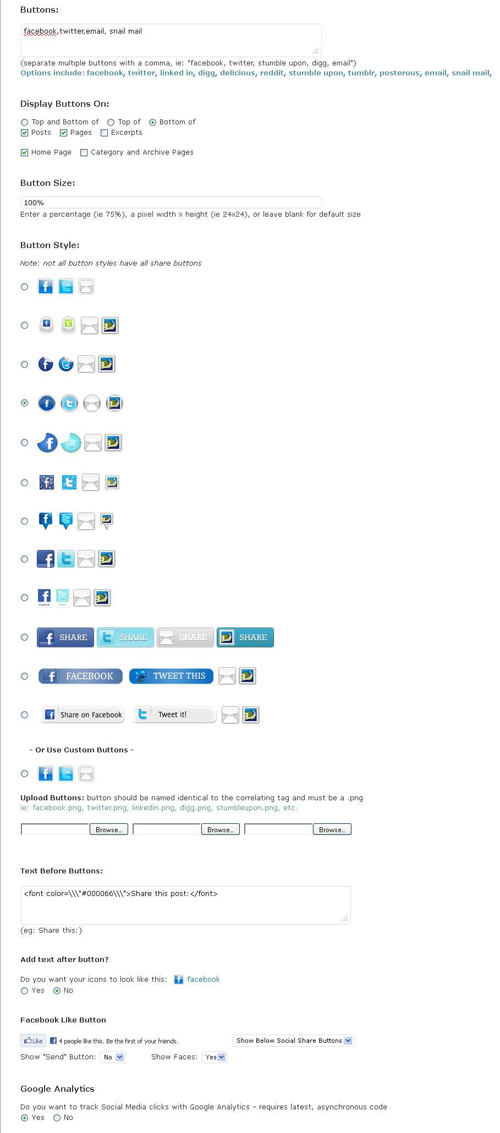
Trackable Social Share Icons is completley customizable, allowing you to choose the look that fits best with your blog. Customization is easily handled from the admin interface, letting you select exactly what you want, including:
- Which social share icons appear: options include Twitter, Facebook, Facebook Like button, LinkedIn, Email, Digg, StumbleUpon, and many more.
- What the social media icons look like. Choose from a dozen different icons options, with and without text, or create and upload your own.
- Social media icon sizes. Trackable Social Share Icons lets you choose exactly what size you want your icons to be, allowing you to enter the pixel dimensions or a percentage.
- Choose the order in which your social media icons appear.
- Choose which parts of your blog the icons appear on: posts, pages, and/or excerpt pages.
- Choose whether the icons appear on top of your posts, on the bottom, or both.
- Ability to disable the icons on the home page, category/archive page, or on any individual posts or pages.
- Turn Google tracking off, if you choose.
- Have the social icons appear in a widget.
- CSS block allows further customization and alignment options.
- Customize the social icons location within posts via shortcode, or place them exactly where you want in your template if you don't like any of the default options.
- Read our customization article for some examples on how to customize the CSS block from the Trackable Sharing admin.
Trackable Social Share Icon Tracking in Google Analytics
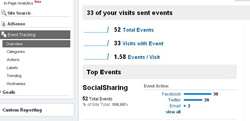
Anytime a user clicks on an icon to share your blog post or page, that click is automatically tracked in Google Analytics. You can find this data in Google Analytics under Content > Event Tracking. Your click data will appear as "SocialSharing" and will be broken out by social media type (Twitter, Facebook, etc) and you can drill down to see exactly which pages were shared, and how many times each page was shared via that social media platform.
Why Use Trackable Social Share Icons?
Social media is growing exponentially, and has become one of the most common ways of online communication. Social media is one of the strongest and fastest ways to share information about your company, blog, or products. Social media also has very valuable SEO benefits -- every time someone shares a link via Twitter or Facebook, that is another backlink pointing to your site. And everytime someone else retweets or reshares that link, that's yet another backlink -- not to mention the traffic that your site can gain as people follow those links. Additionally, Bing is now heavily incorporating Facebook Likes into its ranking algorithm, making social media an integral part of search engine optimization.
Futhermore, Google is beginning to incorporate social media results into its standard search results, and indicators suggest that social media signals are going to become an increasingly significant part of Google's algorithm. Social media is increasingly a non-optional part of every SEO strategy.
Difficulty with Other Plugins
Ecreative Inernet Marketing developed Trackable Social Share Icons after our clients grew frustrated with the existing Wordpress plugin options for social share icons. Often the icons were implemented in a way that was unattractive or not customizable, and they were implemented in a way that made it impossible to track the clicks in Google Analytics. Sometimes the plugin had a separate site with it's own tracking analytics, which never worked as promised.
When we did finally find a plugin solution that was trackable, we learned that all of those clicks were also being reported to a 3rd party marketing agency that collected shocking amounts of data on your users to provide targeted marketing. Not only was this 3rd party tracking somewhat unethical, it also slowed down page load times. Finally we realized that if we wanted a social sharing plugin that worked right and looked good, we'd have to make it ourselves.
If you have any questions about Trackable Social Share Icons, please see our FAQ.
Trackable Social Share Icons Changelog
Version 1.3
- Added Pinterest button as a default
- Added new Google +1 button options. It can now be added inline with other icons (using "plusone") using any icon set. Note that all functionality of the Google +1 button (such as +1 counts) are not available with this implementation. The standard Google +1 button is still available to be placed below standard icons.
Version 1.2
- Added security fix with permissions
Version 1.1
- Added Google +1 button with ability to either have baloon, inline, or no annotations
- Added ability to change Show Support text and link color
Version 1.0
- Added trackable Facebook Like button with optional "Send" button and option to "show face"
- Added ability to hide social icons on the Home Page
- Added ability to hide social icons on Category and Archive Pages
- Added ability to hide social icons on individual posts and pages via checkbox in posts and pages in the admin
- Added ability to add text on the line before the social icons (eg: Share this post:)
- Fixed window focus issue
- Enhanced Snail Mail window
Version 0.9
- Added Trackable Social Share Icons Widget -- now place Social Icons in any widgetized area of your theme!
- Added [trackable_share] tag for greater post/page control -- just insert the shortcode anywhere in a page or post to have the icons appear
- Added call function _trackableshare_embed() for use in templates
- Added ability to upload custom button images
- Added ability to add custom share links (advanced)
- Fixed a link bug on image-only pages (note: this bug only affected pages that Wordpress auto-created containing an image -- this happens when you upload an image with the link to page option)
- Added Delicious
- Added Snail Mail
Version 0.8
- Added ability to display icons on top, bottom, or both
- Added ability to choose whether to display on posts, pages, both, or neither
- Added CSS block to further customize the look and feel of the icons and how they display on the page
- Noscript Support - windows will still popup if JavaScript is not supported or if there is a Javascript error (eg. enabling Google Analytic Tracking without the latest code)
- Updated path to work if
trackable-social-share-iconsfolder name is changed - Updated path to work if
wp-contentorpluginsfolder names are changed in WordPress - Added LinkedIn, Tumblr, Posterous, and Email icons to the
Locationset - Added LinkedIn, Tumblr, Posterous, and Email icons to the
Handy Iconsset
Version 0.7
- Path Fix - fixes broken images in front end and back end
Version 0.6
- Image Fix - in the .5 release some downloads may not have contained the images. The updated version fixes this issue.
Version 0.5
- Public Release
Trackable Social Share Icons Admin Options:
 Support